TeamScape Developer Guide
Table of Contents
- Setting up, getting started
- Design
- Implementation
- Documentation, logging, testing, configuration, dev-ops
- Appendix: Requirements
- Appendix: Instructions for manual testing
Setting up, getting started
Refer to the guide Setting up and getting started.
Design
Architecture
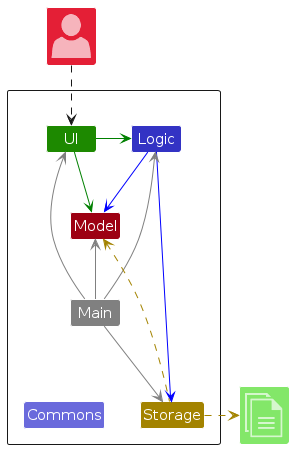
The Architecture Diagram given above explains the high-level design of the App.
Given below is a quick overview of main components and how they interact with each other.
Main components of the architecture
Main (consisting of classes Main and MainApp) is in charge of the app launch and shut down.
- At app launch, it initializes the other components in the correct sequence, and connects them up with each other.
- At shut down, it shuts down the other components and invokes cleanup methods where necessary.
The bulk of the app's work is done by the following four components:
UI: The UI of the App.Logic: The command executor.Model: Holds the data of the App in memory.Storage: Reads data from, and writes data to, the hard disk.
Commons represents a collection of classes used by multiple other components.
How the architecture components interact with each other
The Sequence Diagram below shows how the components interact with each other for the scenario where the user issues the command delete 1.
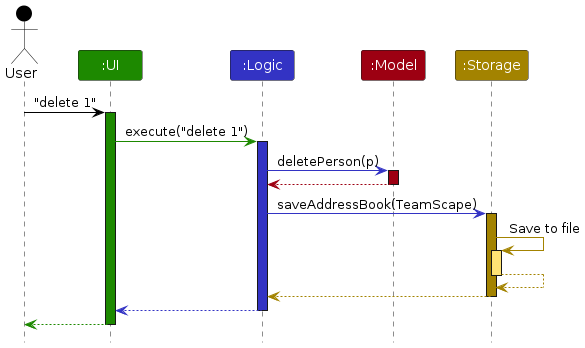
Each of the four main components (also shown in the diagram above),
- defines its API in an
interfacewith the same name as the Component. - implements its functionality using a concrete
{Component Name}Managerclass (which follows the corresponding APIinterfacementioned in the previous point.
For example, the Logic component defines its API in the Logic.java interface and implements its functionality using the LogicManager.java class which follows the Logic interface. Other components interact with a given component through its interface rather than the concrete class (reason: to prevent outside component's being coupled to the implementation of a component), as illustrated in the (partial) class diagram below.
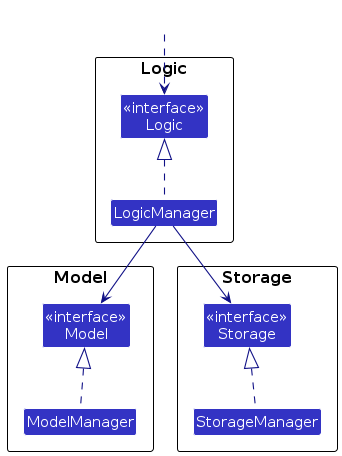
The sections below give more details of each component.
UI component
The API of this component is specified in Ui.java
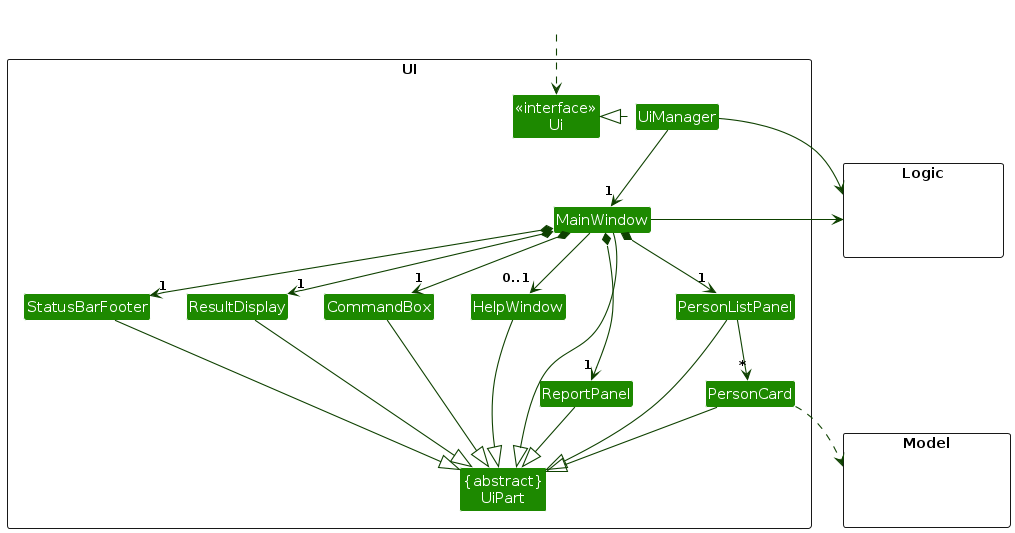
The UI consists of a MainWindow that is made up of parts e.g.CommandBox, ResultDisplay, PersonListPanel, StatusBarFooter etc. All these, including the MainWindow, inherit from the abstract UiPart class which captures the commonalities between classes that represent parts of the visible GUI.
The UI component uses the JavaFx UI framework. The layout of these UI parts are defined in matching .fxml files that are in the src/main/resources/view folder. For example, the layout of the MainWindow is specified in MainWindow.fxml
The UI component,
- executes user commands using the
Logiccomponent. - listens for changes to
Modeldata so that the UI can be updated with the modified data. - keeps a reference to the
Logiccomponent, because theUIrelies on theLogicto execute commands. - depends on some classes in the
Modelcomponent, as it displaysPersonobject residing in theModel.
Logic component
API : Logic.java
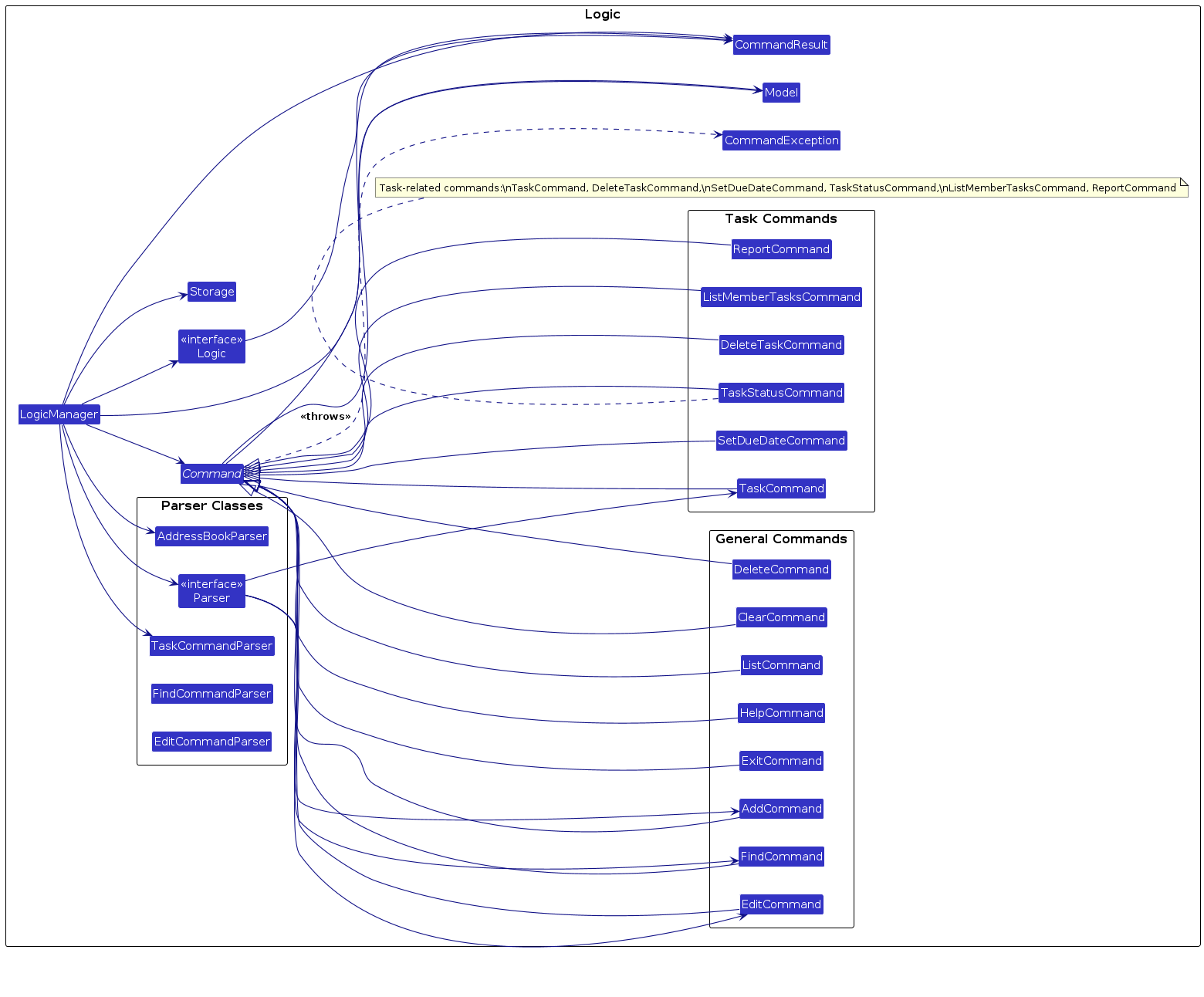
Here's a (partial) class diagram of the Logic component:
The sequence diagram below illustrates the interactions within the Logic component, taking execute("delete 1") API call as an example.
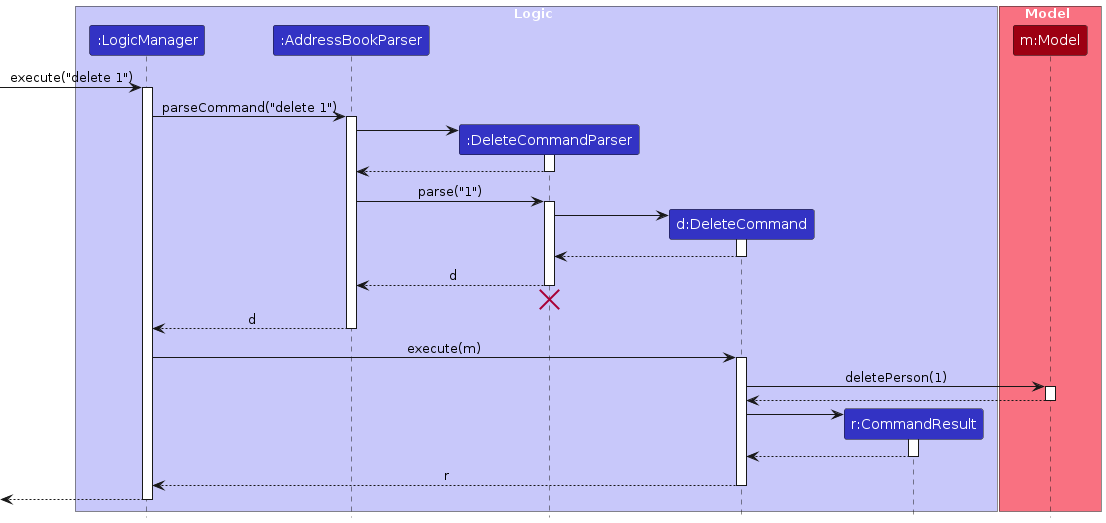
Note: The lifeline for DeleteCommandParser should end at the destroy marker (X) but due to a limitation of PlantUML, the lifeline continues till the end of diagram.
How the Logic component works:
- When
Logicis called upon to execute a command, it is passed to anAddressBookParserobject which in turn creates a parser that matches the command (e.g.,DeleteCommandParser) and uses it to parse the command. - This results in a
Commandobject (more precisely, an object of one of its subclasses e.g.,DeleteCommand) which is executed by theLogicManager. - The command can communicate with the
Modelwhen it is executed (e.g. to delete a member).
Note that although this is shown as a single step in the diagram above (for simplicity), in the code it can take several interactions (between the command object and theModel) to achieve. - The result of the command execution is encapsulated as a
CommandResultobject which is returned back fromLogic.
Here are the other classes in Logic (omitted from the class diagram above) that are used for parsing a user command:
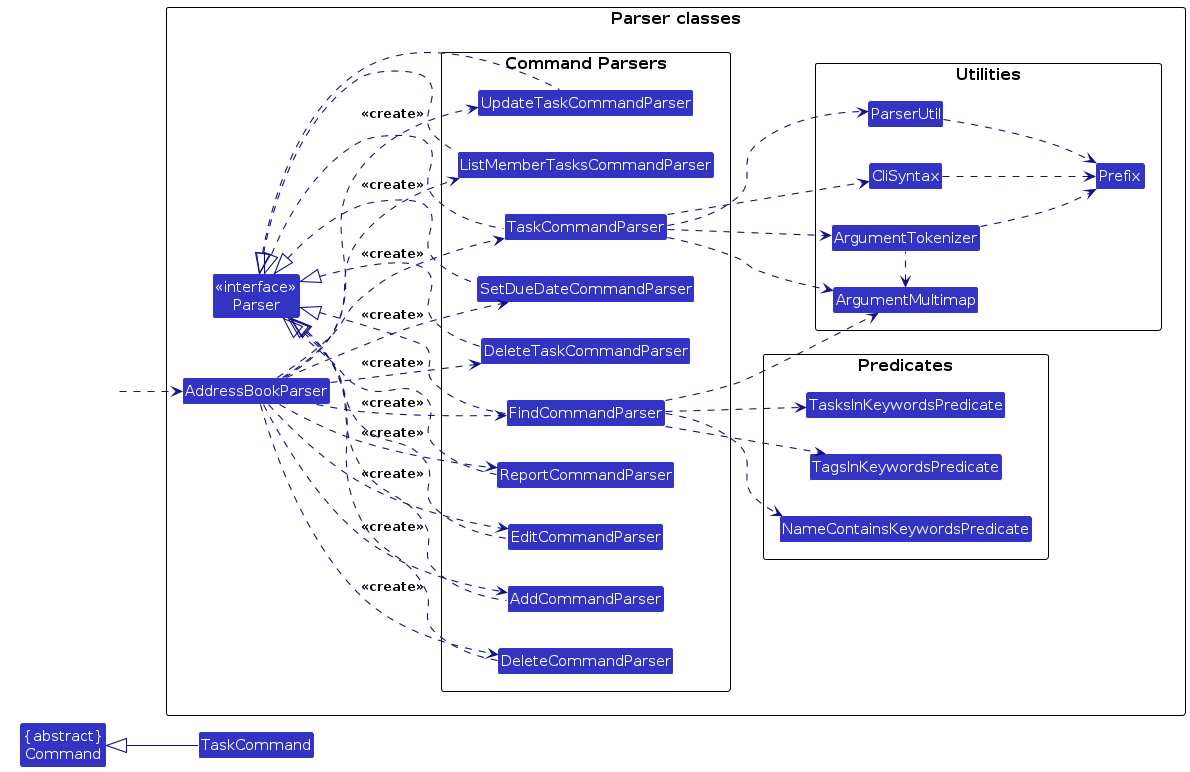
How the parsing works:
- When called upon to parse a user command, the
AddressBookParserclass creates anXYZCommandParser(XYZis a placeholder for the specific command name e.g.,AddCommandParser) which uses the other classes shown above to parse the user command and create aXYZCommandobject (e.g.,AddCommand) which theAddressBookParserreturns back as aCommandobject. - All
XYZCommandParserclasses (e.g.,AddCommandParser,DeleteCommandParser,TaskCommandParser, ...) inherit from theParserinterface so that they can be treated similarly where possible e.g, during testing.
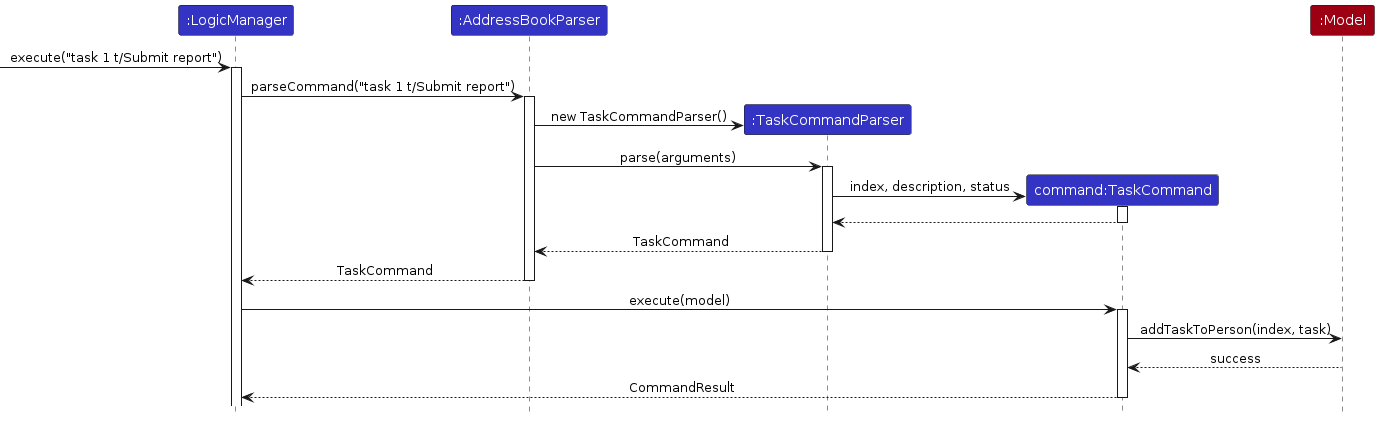
For example, the AddressBookParser will route task commands to TaskCommandParser, which parses the input and creates a TaskCommand object. The TaskCommand class implements the Command interface and defines the execution logic for adding tasks to a member.
The TaskStatus enum provides a standardized way to represent the state of a task, namely YET_TO_START, IN_PROGRESS, and COMPLETED.
Model component
API : Model.java
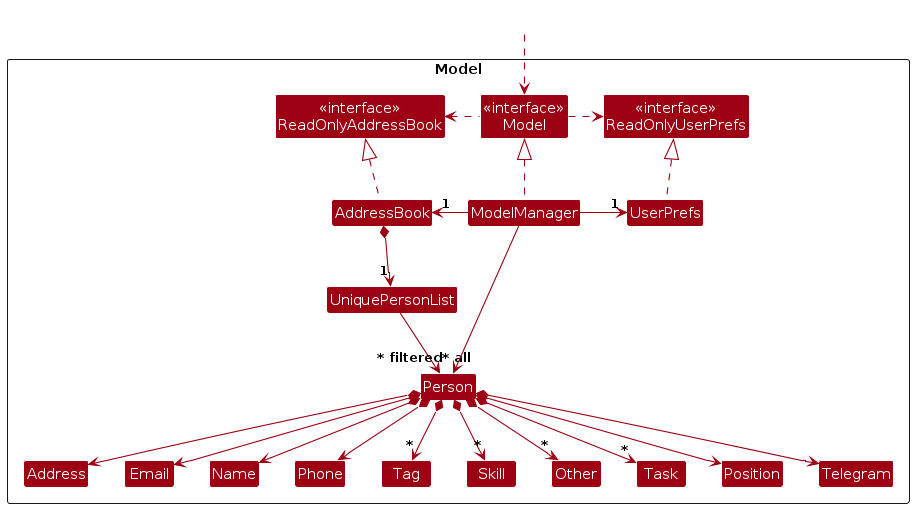
The Model component,
- stores the address book data i.e., all
Personobjects (which are contained in aUniquePersonListobject). - stores the currently 'selected'
Personobjects (e.g., results of a search query) as a separate filtered list which is exposed to outsiders as an unmodifiableObservableList<Person>that can be 'observed' e.g. the UI can be bound to this list so that the UI automatically updates when the data in the list change. - stores a
UserPrefobject that represents the user’s preferences. This is exposed to the outside as aReadOnlyUserPrefobjects. - does not depend on any of the other three components (as the
Modelrepresents data entities of the domain, they should make sense on their own without depending on other components)
Storage component
API : Storage.java
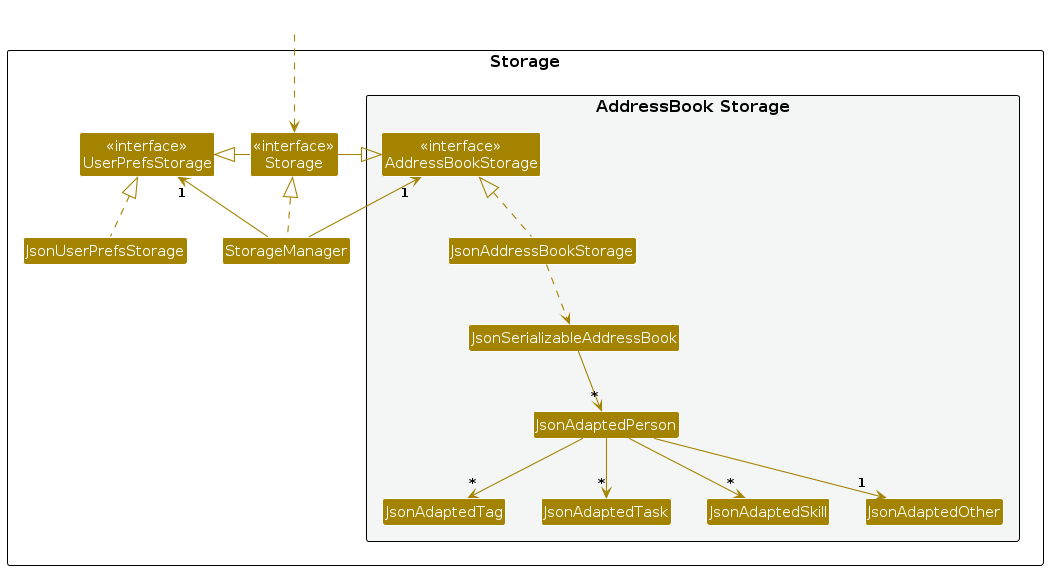
The Storage component,
- can save both address book data and user preference data in JSON format, and read them back into corresponding objects.
- inherits from both
AddressBookStorageandUserPrefStorage, which means it can be treated as either one (if only the functionality of only one is needed). - depends on some classes in the
Modelcomponent (because theStoragecomponent's job is to save/retrieve objects that belong to theModel)
Common classes
Classes used by multiple components are in the seedu.address.commons package.
Implementation
This section describes some noteworthy details on how certain features are implemented.
[Proposed] Undo/redo feature
Proposed Implementation
The proposed undo/redo mechanism is facilitated by VersionedAddressBook. It extends AddressBook with an undo/redo history, stored internally as an addressBookStateList and currentStatePointer. Additionally, it implements the following operations:
VersionedAddressBook#commit()— Saves the current address book state in its history.VersionedAddressBook#undo()— Restores the previous address book state from its history.VersionedAddressBook#redo()— Restores a previously undone address book state from its history.
These operations are exposed in the Model interface as Model#commitAddressBook(), Model#undoAddressBook() and Model#redoAddressBook() respectively.
Given below is an example usage scenario and how the undo/redo mechanism behaves at each step.
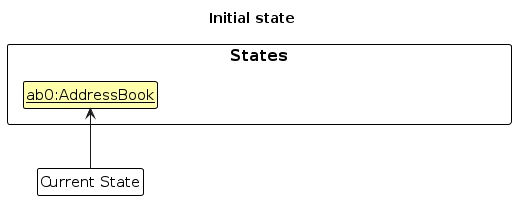
Step 1. The user launches the application for the first time. The VersionedAddressBook will be initialized with the initial address book state, and the currentStatePointer pointing to that single address book state.
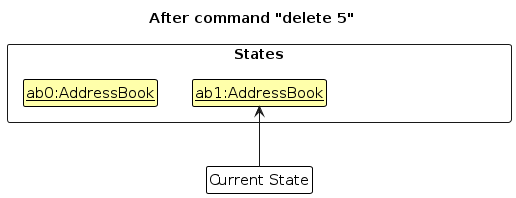
Step 2. The user executes delete 5 command to delete the 5th member in the address book. The delete command calls Model#commitAddressBook(), causing the modified state of the address book after the delete 5 command executes to be saved in the addressBookStateList, and the currentStatePointer is shifted to the newly inserted address book state.
Step 3. The user executes add n/David … to add a new member. The add command also calls Model#commitAddressBook(), causing another modified address book state to be saved into the addressBookStateList.
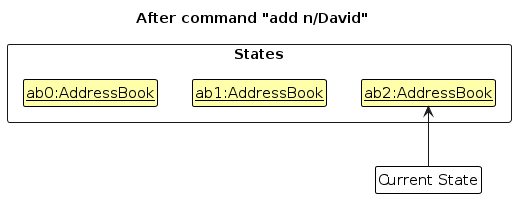
Note: If a command fails its execution, it will not call Model#commitAddressBook(), so the address book state will not be saved into the addressBookStateList.
Step 4. The user now decides that adding the member was a mistake, and decides to undo that action by executing the undo command. The undo command will call Model#undoAddressBook(), which will shift the currentStatePointer once to the left, pointing it to the previous address book state, and restores the address book to that state.
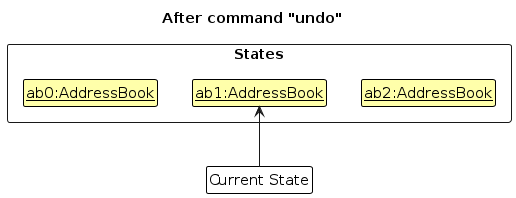
Note: If the currentStatePointer is at index 0, pointing to the initial AddressBook state, then there are no previous AddressBook states to restore. The undo command uses Model#canUndoAddressBook() to check if this is the case. If so, it will return an error to the user rather
than attempting to perform the undo.
The following sequence diagram shows how an undo operation goes through the Logic component:
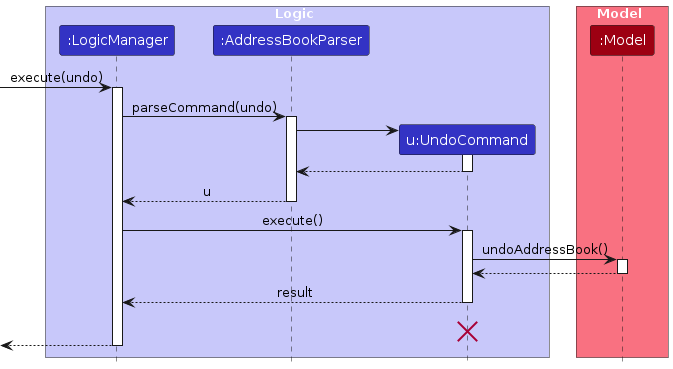
Note: The lifeline for UndoCommand should end at the destroy marker (X) but due to a limitation of PlantUML, the lifeline reaches the end of diagram.
Similarly, how an undo operation goes through the Model component is shown below:
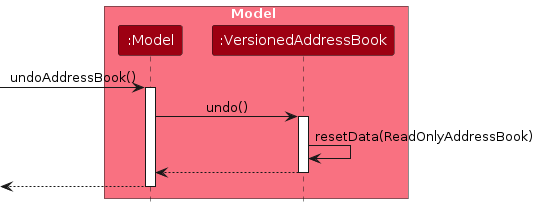
The redo command does the opposite — it calls Model#redoAddressBook(), which shifts the currentStatePointer once to the right, pointing to the previously undone state, and restores the address book to that state.
Note: If the currentStatePointer is at index addressBookStateList.size() - 1, pointing to the latest address book state, then there are no undone AddressBook states to restore. The redo command uses Model#canRedoAddressBook() to check if this is the case. If so, it will return an error to the user rather than attempting to perform the redo.
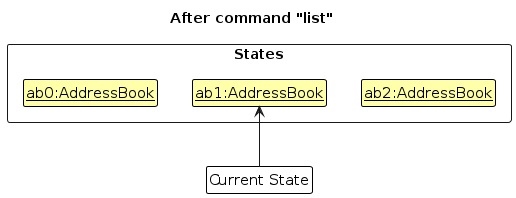
Step 5. The user then decides to execute the command list. Commands that do not modify the address book, such as list, will usually not call Model#commitAddressBook(), Model#undoAddressBook() or Model#redoAddressBook(). Thus, the addressBookStateList remains unchanged.
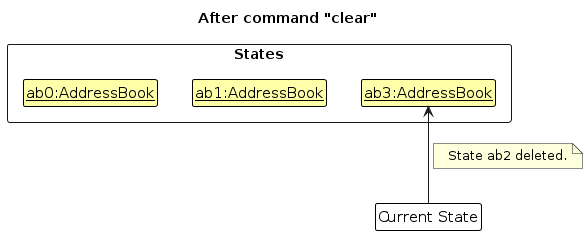
Step 6. The user executes clear, which calls Model#commitAddressBook(). Since the currentStatePointer is not pointing at the end of the addressBookStateList, all address book states after the currentStatePointer will be purged. Reason: It no longer makes sense to redo the add n/David … command. This is the behavior that most modern desktop applications follow.
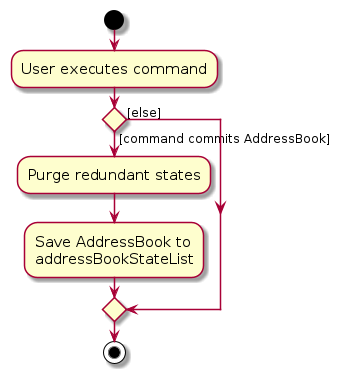
The following activity diagram summarizes what happens when a user executes a new command:
Design considerations:
Aspect: How undo & redo executes:
Alternative 1 (current choice): Saves the entire address book.
- Pros: Easy to implement.
- Cons: May have performance issues in terms of memory usage.
Alternative 2: Individual command knows how to undo/redo by itself.
- Pros: Will use less memory (e.g. for
delete, just save the member being deleted). - Cons: We must ensure that the implementation of each individual command are correct.
- Pros: Will use less memory (e.g. for
{more aspects and alternatives to be added}
Implementation of Task Feature
Overview
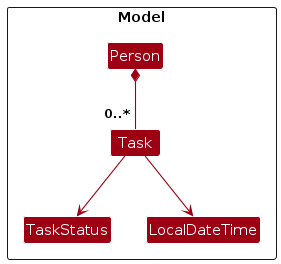
The task feature allows users to assign and manage tasks for individual team members. Each Person object can contain multiple Task instances, each having a description, status, and optional due date.
Task Status Enum
We use an enum TaskStatus to define task states:
YET_TO_STARTIN_PROGRESSCOMPLETED
Commands
| Command | Description |
|---|---|
task | Adds a task to a member |
deltask | Deletes a task from a member |
setduedate | Sets a due date for a specific task |
updatetask | Updates a task for a member |
listtasks | Lists tasks for a specific member |
report | Generates a task completion summary |
Key Implementation Notes
- Tasks are embedded inside the
Personmodel. JsonAdaptedPersonserializes/deserializes thetaskslist.- Tasks are displayed in the UI when
listtasksis used. - All task-related commands extend
Commandand use dedicated parsers.
Task Structure
Task Command Execution Flow
Documentation, logging, testing, configuration, dev-ops
Appendix: Requirements
Product scope
Target user profile:
- has a need to manage a small team (preferably less than 10)
- need efficient way to track and manage team members' progress and status
- does not require online syncing functionality
- does not require multi-user interactions
- prefers typing to mouse interactions
- is reasonably comfortable using CLI apps
Value proposition:
- help users to categorize members by position, grade, skills, and department for easy tracking
- help users to assign tasks, break them into subtasks, and track completion as a percentage
- generate overall statistics for individual members and teams, offering insights into progress and efficiency
User stories
Priorities: High (must have) - * * *, Medium (nice to have) - * *, Low (unlikely to have) - *
| Priority | As a … | I want to … | So that I can… |
|---|---|---|---|
* * * | team manager | add a member, his/her position, department, roles | start tracking my team member progress. |
* * * | team manager | remove inactive team members | keep the team database clean and up-to-date. |
* * * | team manager | add a task under a member | ensure clarity in responsibilities. |
* * * | team manager | be able to change the task as completed/in-progress/yet-to-start | check the status of my tasks. |
* * * | team manager | update the task | edit the content of my tasks. |
* * * | team manager | set due dates for the tasks | know what time each task need to be completed by. |
* * * | team manager | receive a summary report of task statuses | stay informed. |
* * * | team manager | quickly search for members’ contacts by name | call them easily if there is an urgency. |
* * * | user | access interactive tutorials or help pop-ups | quickly learn how to use the app’s features effectively. |
* * | team manager | identify gaps in skills required for the Task and the members/departments assigned to it | assign more people to the Task to fill up the skill gap. |
* * | team manager | search for tasks sorted by their priority levels | know which tasks need immediate attention. |
* * | team manager | search for tasks by their assigned deadline | can know what are the upcoming tasks. |
* * | team manager | filter team members by their availability (sorting by number of tasks) | assign tasks only to those who are not overloaded. |
* * | team manager | edit the position, department, roles of my team members | easily organise my team structure when there is a change. |
* * | team manager | add skills required for a task | know which members/department to assign the task to. |
* * | team manager | set priority levels for tasks | I knows which task need immediate attention and which task can be handled later. |
* * | team manager | set task dependencies (e.g. Task B can only start after Task A is completed) | know if the task have been completed in the right order. |
* * | team manager | see the task completion percentages (no. of subtasks completed out of total no. of subtasks) | easily gauge progress and identify any bottlenecks. |
* * | team manager | generate a report showing the team's overall task completion rate | present it to stakeholders. |
* * | team manager | set reminders for upcoming deadlines | ensure my team stays on track and meets important deadlines. |
* * | team manager | quickly search for team members by their progress completion state | identify and help those who are lagging behind. |
* | team manager | add a task to a department | mass assign tasks to members in that department. |
* | team manager | create subtasks for a task | break down large tasks into smaller, manageable pieces. |
{More to be added}
Use cases
(For all use cases below, the System is the TeamScape and the Actor is the manager, unless specified otherwise)
Use case: UC1 List members
MSS
- Manager requests to list members
- TeamScape shows a list of members
Extensions
1a. The list is empty.
Use case ends.
Use case: UC2 List tasks
MSS
- Manager requests to list tasks.
- TeamScape shows a list of tasks.
Extensions
1a. The task list is empty.
Use case ends.
Use case: UC3 Delete a member
MSS
Manager list members (UC1).
Manager requests to delete a specific member in the list
TeamScape deletes the member
Use case ends.
Extensions
2a. The given index is invalid.
2a1. TeamScape shows an error message.
Use case resumes at step 2.
Use case: UC4 Edit a member
MSS
Manager list members (UC1).
Manager requests to edit a specific member in the list
TeamScape edits the member
Use case ends.
Extensions
2a. The given index is invalid.
2a1. TeamScape shows an error message.
Use case resumes at step 2.
2b. The given inputs contain invalid inputs.
2b1. TeamScape shows an error message
Use case resumes at step 2.
Use case: UC5 Add a member
MSS
Manager requests to add a member to the list
TeamScape adds the member
Use case ends.
Extensions
1a. The details provided are invalid.
1a1. TeamScape shows an error message.
Use case resumes at step 1.
Use case: UC6 Add a task under a member
MSS
Manager list members (UC1).
Manager list tasks (UC2).
Manager requests to add a task under a member.
TeamScape adds a task under a member.
Use case ends.
Extensions
3a. The given index for either task is invalid.
3a1. TeamScape shows an error message.
Use case resumes at step 2.
3b. The given index for either member is invalid.
3b1. TeamScape shows an error message.
Use case resumes at step 2.
Use case: UC7 Edit a task under a member
MSS
Manager list members (UC1).
Manager list tasks (UC2).
Manager requests to change a task under a member.
TeamScape changes a task under a member.
Use case ends.
Extensions
3a. The given index for either task is invalid.
3a1. TeamScape shows an error message.
Use case resumes at step 2.
3b. The given index for either member is invalid.
3b1. TeamScape shows an error message.
Use case resumes at step 2.
Use case: UC8 Create a task
MSS
Manager requests to create a task.
TeamScape creates a task.
Use case ends.
Extensions
1a. Invalid task input.
1a1. TeamScape shows an error message.
Use case ends.
Use case: UC9 Set a due date for a task
MSS
Manager list tasks (UC2).
Manager requests to set a due date for a task.
TeamScape set a due date for a task.
Use case ends.
Extensions
2a. The given task index is invalid.
2a1. TeamScape shows an error message.
Use case resumes at step 2.
2b. The due date format is invalid.
2b1. TeamScape shows an error message.
Use case resumes at step 2.
2c. The due date is in the past.
2b1. TeamScape shows an error message.
Use case resumes at step 2.
Use case: UC10 Update the task as completed, in progress, or yet to start
MSS
Manager list tasks (UC2).
Manager requests to update a task as completed, in progress, or yet to start.
TeamScape mark the task by the given status.
Use case ends.
Extensions
2a. The given task index is invalid.
2a1. TeamScape shows an error message.
Use case resumes at step 2.
2a. The status is invalid.
2a1. TeamScape shows an error message.
Use case resumes at step 2.
Use case: UC11 Find and return members’ contact by name
MSS
Manager requests to find the member by name.
TeamScape finds the member.
Use case ends.
Extensions
1a. Empty member list
1a1. TeamScape shows an error message.
Use case ends.
1b. No member of the name found.
1b1. TeamScape shows an error message.
Use case ends.
Use case: UC12 Generate task status report
MSS
Manager requests to generate tasks status report.
TeamScape generate tasks status report and show.
Use case ends.
Extensions
- 1a. Empty task list
1a1. TeamScape shows a No Task Found message.
Use case ends.
Use case: UC13 Use of help command
MSS
Manager requests to get help.
TeamScape prompts manager.
Manager input a prompt.
TeamScape shows user guide. Steps 3 and 4 are repeated until Manager requests to exit help mode.
User requests to exit help mode.
TeamScape exits help mode.
Use case ends.
Extensions
4a. Invalid input from user.
4a1. TeamScape shows an error message.
Use case resumes at step 2.
*a. At any time, manager chooses to exit help mode
*a1. TeamScape exits help mode.
Use case ends.
{More to be added}
Non-Functional Requirements
Based on the latest implementation of TeamScape:
- Should work on any mainstream OS with specifically Java 17.
- Should support up to 1 member and their associated tasks with minimal performance degradation.
- Application should function fully offline with no internet connection.
- Command input should be case-insensitive and provide informative error messages on incorrect format.
- Should recover the last known good state if the app crashes unexpectedly.
- Should allow real-time UI refresh when task status or due date is updated.
- Should complete most operations (e.g., add, delete, update) within 200ms.
- Should retrieve and display 1000 records within 1.5s.
- Should not allow duplicate tasks to be added for a member.
- Should not allow duplicate members.
- Should highlight invalid commands with contextual prompts and guide users on correct input format.
- Should ensure extensibility of task logic by modularizing command parser, validator, and model layers.
- Should keep memory usage under 200MB during peak load.
Glossary
- CLI: Command Line Interface. A text-based way to interact with the app (e.g.,
add n/John). - Mainstream OS: Windows, Linux, Unix, macOS.
- Private contact detail: A contact detail not meant to be shared (e.g., personal phone number).
- Task: A unit of work assigned to a team member, which can have subtasks and deadlines.
- Subtask: A smaller component of a task (e.g., "Design UI mockups" as part of "Develop login feature").
- Model: The component managing data (e.g., storing team members and tasks).
- UI: User Interface. The visual part of the app (e.g., buttons, lists).
- Storage: Component that saves/loads data to/from the hard drive.
- API: Application Programming Interface. How components interact (e.g.,
Logic.javadefines the API for executing commands). - JSON: A file format used to store data (e.g., team members are saved in
addressbook.json). - TeamScape: The system in which the users will interact with to save contacts into and assign tasks to contacts.
- Displayed person list: The current list of persons displayed to users by GUI; could be a result of
listorfindcommand.
Appendix: Instructions for manual testing
Given below are instructions to test the app manually.
Note: These instructions only provide a starting point for testers to work on; testers are expected to do more exploratory testing.
Launch and shutdown
Initial launch
Download the jar file and copy into an empty folder
Double-click the jar file or run file with
java -jar TeamScape.jar(recommended)
Expected: Shows the GUI with a set of sample contacts. The window size may not be optimum.
Saving window preferences
Resize the window to an optimum size. Move the window to a different location. Close the window.
Re-launch the app by double-clicking the jar file.
Expected: The most recent window size and location is retained.
Adding a member
Prerequisites:
- List all members using the
listcommand. - Ensure there are no members with the same details you're about to add.
Test case:
add n/John Doe p/98765432 e/johnd@example.com tele/@john pos/student a/John street, block 123, #01-01
Expected:- New contact is added to the list.
- Details of the added contact shown in the status message.
- Contact list updated with the new member.
Test case:
add n/John Doe p/98765432(missing required fields)
Expected:- No member is added.
- Error details shown in the status message.
- Member list not updated.
Other incorrect add commands to try:
add n/John Doe(missing required fields)add p/98765432 e/johnd@example.com(missing name)add n/John Doe p/invalid e/invalid(invalid formats)
Expected: Similar to previous error case.
Adding a task to a member
Prerequisites:
- Have at least one member in the address book.
- View this member using
listorfindcommand.
Test case:
task 1 task/Prepare report, 2025-10-10 10:00, in progress
Expected:- Task is added to the first member's task list.
- Status message shows task was added.
Test case:
task 1 task/Book venue(minimal task)
Expected:- Task is added with default "yet to start" status.
- Status message confirms addition.
Test case:
task 0 task/Invalid task
Expected:- No task added.
- Error shown for invalid index.
Editing a member
Prerequisites:
- Have at least one member in the address book.
- View this member using
listcommand.
Test case:
edit 1 p/91234567 e/johndoe@example.com
Expected:- First member's phone and email are updated.
- Status message shows changes.
Test case:
edit 1 t/(clearing tags)
Expected:- All tags removed from first member.
- Status message confirms changes.
Test case:
edit 0 n/Invalid
Expected:- No changes made.
- Error shown for invalid index.
Setting due date for a task
Prerequisites:
- Have at least one member with at least one task.
Test case:
setduedate 1 taskint/1 due/2026-02-28 23:59
Expected:- Due date set for first task of first member.
- Status message confirms change.
Test case:
setduedate 1 taskint/1 due/2020-01-01 00:00(past date)
Expected:- No changes made.
- Error message shown.
Other incorrect commands to try:
setduedate 1 taskint/1 due/2025-10-10,setduedate 1 /taskint 1 due/2025-10-10 23:59
Expected:- Error message shown.
Listing tasks assigned to a member
Prerequisites:
- Have at least one member with tasks.
Test case:
listtasks 1
Expected:- Tasks for first member displayed.
- Status bar shows command success.
Test case:
listtasks 0
Expected:- No tasks shown.
- Error about invalid index.
Deleting a task under a member
Prerequisites:
- Have at least one member with at least one task.
Test case:
deltask 1 1
Expected:- First task of first member deleted.
- Status message confirms deletion.
Test case:
deltask 1 0
Expected:- No task deleted.
- Error about invalid index.
Updating task for a member
Prerequisites:
- Have at least one member with at least one task.
Test case:
updatetask 1 1 completed
Expected:- First task of first member updated as completed from its previous state.
- Successful message confirms update and shows new task details.
Test case:
updatetask 3 2 project milestone 1 sprint, 2025-05-12 10:00, in progress
Expected:- Third task of second person updated as completed from its previous state.
- Successful message to confirm update and shows new task details.
Test case:
updatetask 3 2 project milestone 1 sprint, invalidDateorTaskStatus
Expected:- No change to the specified task
- Error message shows specified error.
Finding members
Prerequisites:
- Have several members with different names, tags, and tasks.
Test case:
find n/ john
Expected:- Members with "john" in name displayed.
- Status shows number of matches.
Test case:
find t/ friend
Expected:- Members with "friend" tag displayed.
Test case:
find task/ report
Expected:- Members with tasks containing "report" displayed.
Test case:
find n/ john t/ friend
Expected:- Members matching both name and tag criteria displayed.
Generating Task Status Report
Prerequisites:
- Have several members with tasks in different statuses.
- Tasks should be categorized into statuses: Yet to Start, In Progress, and Completed.
- Member should have at least one task to be included in the report.
- Test case:
report
Expected:- A summary report is displayed, grouping tasks by their status (Yet to Start, In Progress, Completed).
- Each status section shows the number of member with tasks in parentheses.
- Member under each status have their tasks listed in the order they were assigned.
- Status bar confirms successful execution
Deleting a member
Prerequisites:
- Deleting a member while all members are being shown
- List all members using the
listcommand. Multiple members in the list.
Test case:
delete 1
Expected:- First contact is deleted from the list. Details of the deleted contact shown in the status message. Timestamp in the status bar is updated.
Test case:
delete 0
Expected:- No member is deleted. Error details shown in the status message. Status bar remains the same.
Other incorrect delete commands to try:
delete,delete x,...(where x is larger than the list size)
Expected:- Similar to previous.
Appendix: Effort
While this project is a spin-off from AB3, the project was harder due to the introduction of new functions and the purpose of helping team manager to manage tasks. Hence, we needed to create more entities (Classes) to encapsulate attributes and relationships between entity interactions.
Major challenges encountered includes collaboration between team members especially when there are frequent merge conflicts, introduction of new classes and commands which requires deep understanding of AB3 dependencies, and consensus about certain feature design/UI within the team.
As per our implementation, we achieved a brand new Command Line Interface (CLI) application which not only helps users to manage contacts and their information, our target audience, team leaders, can also reap the benefits of task management.
Using of app, managers can assign multiple tasks under a specific member, check the tasks information such as due date and status under the member, remove task, and generate a holistic task report to check progress and status.
Appendix: Planned Enhancements
Tasks
Tasks assigned to a member will only accept tasks that are actively being worked on. Tasks with a "completed" status and due in the past will not be allowed, as the task system is not intended to store records of completed tasks. Such records will be stored and managed elsewhere.
Since the Tasks feature is not designed to serve as a storage system, it should only accommodate a reasonable number of tasks, ideally between 5 to 10. Therefore, there is no need to label tasks on display with an index.
Add a task to a department
Add skills required for a task
Identify gaps in skills required for a task and the members/departments assigned to it
Set task dependencies (e.g. Task B can only start after Task A)
Create subtasks for a task